Get Easy Access to Documents You Use Often
The Work menu is a great Word feature that few people know about. You can use the Work menu to keep an easily accessible list of your favorite Word files.
To add the Work menu to the menu bar or a toolbar:
1. On the Tools menu, click Customize, and then click the Commands tab.
2. In the Categories box, click Built-in Menus.
3. Click Work in the Commands box and drag it to the menu bar or displayed toolbar.
With the Work menu in place, you can add any open Word document to your list. Here are the options:
§ To add the current document to the Work menu, on the Work menu, click Add to Work Menu.
§ To open a document on the Work menu, on the Work menu, click the document you want to open.
§ To remove a document from the Work menu:
§ Press CTRL+ALT+- (dash key). Your cursor will look like a large, bold underscore.
§ On the Work menu, click the document you want to remove.
Get Informer means To Get Informed on All Information Here. Fun, Songs, Videos, Latest Pictures, Google Ad sense, Urdu SMS, Poetry, Cricket and More. Just Keep Visiting For more Updates
Showing posts with label Tips And Tricks. Show all posts
Showing posts with label Tips And Tricks. Show all posts
Tuesday, 27 October 2009

Tuesday, 20 October 2009
10 Most Useful Free Twitter Tools for Bloggers
I present to you my list of 10 most useful free Twitter tools for bloggers that we use daily and find of the most practical use in our blogging routine. I am sure you too would want to grab all these tools for your blog. Check them out.
Best Twitter Tools for Bloggers
1. Twitterfeed – This amazing tool will let you publish updates from any RSS feed to your Twitter account. You can decide how frequently you want Twitterfeed to check your feed updates and how many updated articles to post to Twitter so that you dont overwhelm your twitter followers with tweets. If you follow us on Twitter, you know we direct our blog feed, photoblog feed, new jobs feed, delicious feed all via Twitter feed and keep updating our Twitter account automatically.
2. Tweetdeck - I know there are lots of Twitter desktop clients out there. For one fact, Twitstats says Tweetdeck is the most popular Twitter client in the market. Next it allows you to keep control of multiple Twitter profiles and keep regular track of your tweets, profile mentions, replies and direct messages – all on one screen. For me, it is the best way to keep using Twitter like a pro. Another popular alternative is Twhirl.
3. Twitpic – Simply put, TwitPic lets you share photos on Twitter. Now most popular Twitter clients have inbuilt support for Twitpic. This a valuable addition to make your tweets interesting. If you want to share videos, its worth taking a look at Twiddeo or Vidly.
4. Tweetmeme Button – this nifty button has emerged as the most popular way to get your articles retweeted. Supporting various blogging platforms and websites, a Tweetmeme button is the best way to get retweeted and make your article go viral across Twitter for extra site traffic. We use the Tweetmeme Wordpress plugin on our blog and you can spot the green retweet button on this page and our feed.
5. Twitter Counter - is a statistics tools which allows you to show off your Twitter followers count on your blog. It will also show you how rapidly your followers are increasing (or decreasing!) over the week or months. See how our Twitter follower counts looks like. You can also add their Twitter Remote widget to your blog sidebar for more interaction. If you really want to look for the most popular twitter users, catch them Twitterholic.
6. Wickett Twitter Widget – As seen on many blogs on WordPress.com, it displays tweets from a Twitter account in the sidebar of your blog. It is by far the easiest, lightest and best way to add Tweets to Wordpress. Here are more tools to integrate Twitter with Wordpress.
7. Twitter Search Widget - Official Twitter widget which provides a cool custom interface to display your own profile search results in your sidebar. An excellent way to show how popular you are on Twitter as hundreds of your profile mentions and replies scroll across your blog every second. There is an official profile widget also if that suits your need better. Here is an official Twitter badge for Blogger.
8. Twibbon – lets you add a logo of your website or a cause you support to your twitter profile avatar. This also enables your supporters to add the same logo to their profiles and show support for your blog or cause and is great to develop a community of supporters and get lots of publicity.
9. Twitterberry – is a popular Twitter client for Blackberry mobile phones. It helps me stay connected with my Twitter account anywhere in the world and on the move. I can access my Twitter followers, get replies and post tweets without my computer. My friends with Iphone and ipod Touch will like Twitterific or Twitterfon. Other mobile phone users can check the official mobile version of Twitter.
10. Twitbin – is a firefox extension that allows you to keep up with all of your Twitter conversations right from your browser sidebar. This really helps you stay connected with your followers while you are busy blogging. Or open Twitter 100 in a tab and keep following latest tweets from 100 followers on one screen.
What are your most useful tools which you use on a daily basis? Post in comments and I will add to the article. Image by mark.benton
Get Informer means To Get Informed on All Information Here. Fun, Songs, Videos, Latest Pictures, Google Ad sense, Urdu SMS, Poetry, Cricket and More. Just Keep Visiting For more Updates
Best Twitter Tools for Bloggers

1. Twitterfeed – This amazing tool will let you publish updates from any RSS feed to your Twitter account. You can decide how frequently you want Twitterfeed to check your feed updates and how many updated articles to post to Twitter so that you dont overwhelm your twitter followers with tweets. If you follow us on Twitter, you know we direct our blog feed, photoblog feed, new jobs feed, delicious feed all via Twitter feed and keep updating our Twitter account automatically.
2. Tweetdeck - I know there are lots of Twitter desktop clients out there. For one fact, Twitstats says Tweetdeck is the most popular Twitter client in the market. Next it allows you to keep control of multiple Twitter profiles and keep regular track of your tweets, profile mentions, replies and direct messages – all on one screen. For me, it is the best way to keep using Twitter like a pro. Another popular alternative is Twhirl.
3. Twitpic – Simply put, TwitPic lets you share photos on Twitter. Now most popular Twitter clients have inbuilt support for Twitpic. This a valuable addition to make your tweets interesting. If you want to share videos, its worth taking a look at Twiddeo or Vidly.
4. Tweetmeme Button – this nifty button has emerged as the most popular way to get your articles retweeted. Supporting various blogging platforms and websites, a Tweetmeme button is the best way to get retweeted and make your article go viral across Twitter for extra site traffic. We use the Tweetmeme Wordpress plugin on our blog and you can spot the green retweet button on this page and our feed.
5. Twitter Counter - is a statistics tools which allows you to show off your Twitter followers count on your blog. It will also show you how rapidly your followers are increasing (or decreasing!) over the week or months. See how our Twitter follower counts looks like. You can also add their Twitter Remote widget to your blog sidebar for more interaction. If you really want to look for the most popular twitter users, catch them Twitterholic.
6. Wickett Twitter Widget – As seen on many blogs on WordPress.com, it displays tweets from a Twitter account in the sidebar of your blog. It is by far the easiest, lightest and best way to add Tweets to Wordpress. Here are more tools to integrate Twitter with Wordpress.
7. Twitter Search Widget - Official Twitter widget which provides a cool custom interface to display your own profile search results in your sidebar. An excellent way to show how popular you are on Twitter as hundreds of your profile mentions and replies scroll across your blog every second. There is an official profile widget also if that suits your need better. Here is an official Twitter badge for Blogger.
8. Twibbon – lets you add a logo of your website or a cause you support to your twitter profile avatar. This also enables your supporters to add the same logo to their profiles and show support for your blog or cause and is great to develop a community of supporters and get lots of publicity.
9. Twitterberry – is a popular Twitter client for Blackberry mobile phones. It helps me stay connected with my Twitter account anywhere in the world and on the move. I can access my Twitter followers, get replies and post tweets without my computer. My friends with Iphone and ipod Touch will like Twitterific or Twitterfon. Other mobile phone users can check the official mobile version of Twitter.
10. Twitbin – is a firefox extension that allows you to keep up with all of your Twitter conversations right from your browser sidebar. This really helps you stay connected with your followers while you are busy blogging. Or open Twitter 100 in a tab and keep following latest tweets from 100 followers on one screen.
What are your most useful tools which you use on a daily basis? Post in comments and I will add to the article. Image by mark.benton
Get Informer means To Get Informed on All Information Here. Fun, Songs, Videos, Latest Pictures, Google Ad sense, Urdu SMS, Poetry, Cricket and More. Just Keep Visiting For more Updates
Thursday, 15 October 2009
How to embed youtube videos that are disabled?
Do You know that How to embed you tube videos that are disabled? I think Recently You tube added a new feature to the video player used to embed Youtube videos on other website.
 Some times When we watch the video on YouTube. IF you want catch the Embed video on your blog. Ok that's no problem, because youtube have been providing script code to embedded video on your blog.
But You Don't Catch the all of video for Your Blog Because Some time You'll see words "Embedding disabled by request" and no script code in there.
However video without script code, you still can do embedded video in your blog. How to do it?
Follow below steps to embed the embedding disabled video from you tube.
1. go to you tube and copy the URL of the video you want to integrate
ex:- http://in.youtube.com/watch?v=l44FI9Pzq
2. Visit Web portal called dinitillion and select the option to embed YouTube videos with embedding disabled as shown in the following image
3. Copy and paste the URL as shown in the picture below

Get Informer means To Get Informed on All Information Here. Fun, Songs, Videos, Latest Pictures, Google Ad sense, Urdu SMS, Poetry, Cricket and More. Just Keep Visiting For more Updates
 Some times When we watch the video on YouTube. IF you want catch the Embed video on your blog. Ok that's no problem, because youtube have been providing script code to embedded video on your blog.
But You Don't Catch the all of video for Your Blog Because Some time You'll see words "Embedding disabled by request" and no script code in there.
However video without script code, you still can do embedded video in your blog. How to do it?
Follow below steps to embed the embedding disabled video from you tube.
1. go to you tube and copy the URL of the video you want to integrate
ex:- http://in.youtube.com/watch?v=l44FI9Pzq
2. Visit Web portal called dinitillion and select the option to embed YouTube videos with embedding disabled as shown in the following image
3. Copy and paste the URL as shown in the picture below

Get Informer means To Get Informed on All Information Here. Fun, Songs, Videos, Latest Pictures, Google Ad sense, Urdu SMS, Poetry, Cricket and More. Just Keep Visiting For more Updates
Extend Your Laptop’s Battery Life
One of the most important aspect when you buy a laptop should be the life battery, and after  you buy it, you should take care of it and try to extend it as much as you can.Here are some tips for extending your laptop's battery life.
First of all, you should defrag your hard drives regularly and pay attention to the fact that the faster your laptop's hard drive works, less demand you are putting on the hard drive and the battery. You should make your hard drives as efficient as possible, and defrag them. It is well known that Mac OSX is built to handle better the fragmentation and it may not be very applicable to computer with Apple OS installed.
You can "cut" the laptop screen to the lowest level of dim, so you can modify the CPU and cooling performances. This is another way you can aqueeze some battery juice, and also you should throw an eye to the programs running on background, because they are all added to the CPU load and they cut battery life. Shut down everything you think it is not crucial when you are on battery.Other aditional devices which should be cut in order to extend the battery life are the external devices, and I think you can quit the coffee warmer, or the mini drum kit when you are on battery. All these USB devices, including the mouse, and the Wi-Fi drain the laptop battery.

To extend your laptop's battery life, you should think about adding some more RAM, whcih will alow your laptop to process more with the mamory it has, than based on the virtual memory. This virtual memory usage means that you take space from the hard disk, and it has a very low eficiency. This is very aplicable to situation when you run programs which require a lot of virtual memory.
One of the most important aspect when you buy a laptop should be the life battery, and after you buy it, you should take care of it and try to extend it as much as you can.Here are some tips for extending your laptop's battery life.
First of all, you should defrag your hard drives regularly and pay attention to the fact that the faster your laptop's hard drive works, less demand you are putting on the hard drive and the battery. You should make your hard drives as efficient as possible, and defrag them. It is well known that Mac OSX is built to handle better the fragmentation and it may not be very applicable to computer with Apple OS installed.
You can "cut" the laptop screen to the lowest level of dim, so you can modify the CPU and cooling performances. This is another way you can aqueeze some battery juice, and also you should throw an eye to the programs running on background, because they are all added to the CPU load and they cut battery life. Shut down everything you think it is not crucial when you are on battery.Other aditional devices which should be cut in order to extend the battery life are the external devices, and I think you can quit the coffee warmer, or the mini drum kit when you are on battery. All these USB devices, including the mouse, and the Wi-Fi drain the laptop battery.
Get Informer means To Get Informed on All Information Here. Fun, Songs, Videos, Latest Pictures, Google Ad sense, Urdu SMS, Poetry, Cricket and More. Just Keep Visiting For more Updates
 you buy it, you should take care of it and try to extend it as much as you can.Here are some tips for extending your laptop's battery life.
First of all, you should defrag your hard drives regularly and pay attention to the fact that the faster your laptop's hard drive works, less demand you are putting on the hard drive and the battery. You should make your hard drives as efficient as possible, and defrag them. It is well known that Mac OSX is built to handle better the fragmentation and it may not be very applicable to computer with Apple OS installed.
You can "cut" the laptop screen to the lowest level of dim, so you can modify the CPU and cooling performances. This is another way you can aqueeze some battery juice, and also you should throw an eye to the programs running on background, because they are all added to the CPU load and they cut battery life. Shut down everything you think it is not crucial when you are on battery.Other aditional devices which should be cut in order to extend the battery life are the external devices, and I think you can quit the coffee warmer, or the mini drum kit when you are on battery. All these USB devices, including the mouse, and the Wi-Fi drain the laptop battery.

To extend your laptop's battery life, you should think about adding some more RAM, whcih will alow your laptop to process more with the mamory it has, than based on the virtual memory. This virtual memory usage means that you take space from the hard disk, and it has a very low eficiency. This is very aplicable to situation when you run programs which require a lot of virtual memory.
One of the most important aspect when you buy a laptop should be the life battery, and after you buy it, you should take care of it and try to extend it as much as you can.Here are some tips for extending your laptop's battery life.
First of all, you should defrag your hard drives regularly and pay attention to the fact that the faster your laptop's hard drive works, less demand you are putting on the hard drive and the battery. You should make your hard drives as efficient as possible, and defrag them. It is well known that Mac OSX is built to handle better the fragmentation and it may not be very applicable to computer with Apple OS installed.
You can "cut" the laptop screen to the lowest level of dim, so you can modify the CPU and cooling performances. This is another way you can aqueeze some battery juice, and also you should throw an eye to the programs running on background, because they are all added to the CPU load and they cut battery life. Shut down everything you think it is not crucial when you are on battery.Other aditional devices which should be cut in order to extend the battery life are the external devices, and I think you can quit the coffee warmer, or the mini drum kit when you are on battery. All these USB devices, including the mouse, and the Wi-Fi drain the laptop battery.
Get Informer means To Get Informed on All Information Here. Fun, Songs, Videos, Latest Pictures, Google Ad sense, Urdu SMS, Poetry, Cricket and More. Just Keep Visiting For more Updates
How to filter incoming messages and block or allow from specific sender or domain
To organize your Inbox by creating filters to direct incoming messages to specific folders, please follow these steps:
1. Sign in to the Windows Live Hotmail website with your Windows Live Hotmail account.
2. In the upper-right corner of the page, click Options, and then click More options.
3. Under Customize your mail, click Automatically sort e-mail into folders.
4. Perform one of the actions as per your requirement:
Click New filter to Create a new filter
Or
Click Edit next to the filter that you want to edit.
Or
Click Delete next to the filter that you want to delete.
5. Follow the on-screen instructions to specify which messages you want to filter and where you want to filter them, and then click Save.
Note: Not all international characters are supported as filters.
Get Informer means To Get Informed on All Information Here. Fun, Songs, Videos, Latest Pictures, Google Ad sense, Urdu SMS, Poetry, Cricket and More. Just Keep Visiting For more Updates
1. Sign in to the Windows Live Hotmail website with your Windows Live Hotmail account.
2. In the upper-right corner of the page, click Options, and then click More options.
3. Under Customize your mail, click Automatically sort e-mail into folders.
4. Perform one of the actions as per your requirement:
Click New filter to Create a new filter
Or
Click Edit next to the filter that you want to edit.
Or
Click Delete next to the filter that you want to delete.
5. Follow the on-screen instructions to specify which messages you want to filter and where you want to filter them, and then click Save.
Note: Not all international characters are supported as filters.
Get Informer means To Get Informed on All Information Here. Fun, Songs, Videos, Latest Pictures, Google Ad sense, Urdu SMS, Poetry, Cricket and More. Just Keep Visiting For more Updates
Tuesday, 8 September 2009
How to love Lungs
I'm addicted to frou frou. i was as an instant fan by the end of the first time i saw and heard their video for breathe in. that was way back 2002(?). five years and relentless scouring of music stores for their one and only album later, it is only now that i am able to listen to details. i'm totally lost, but in a good way, in between the dreamy layered voice of imogen and the peculiar but soothing and ingenious arrangements of guy.
so if you like electronica with a dash of soul and playful lyrics you should give frou frou a listen. satisfaction guaranteed!
Get Informer means To Get Informed on All Information Here. Fun, Songs, Videos, Latest Pictures, Google Adsense, Urdu SMS, Poetry, Cricket and More. Just Keep Visitin For more Updates
so if you like electronica with a dash of soul and playful lyrics you should give frou frou a listen. satisfaction guaranteed!
Get Informer means To Get Informed on All Information Here. Fun, Songs, Videos, Latest Pictures, Google Adsense, Urdu SMS, Poetry, Cricket and More. Just Keep Visitin For more Updates
Sunday, 2 August 2009
Disable Highlighting of Newly Installed Programs in Windows XP
Disable Highlighting of Newly Installed Programs in Windows XP:
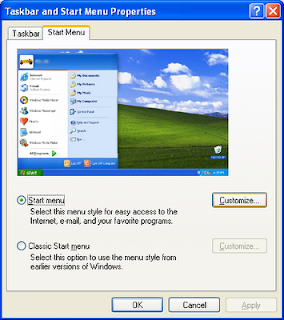
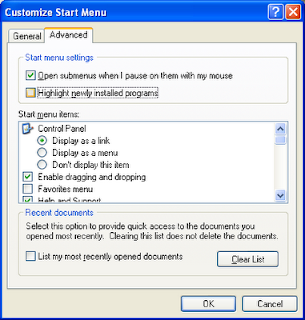


This is a feature of XP that sometimes ikrs me.
And guess what? This can be easily disabled in a few simple steps.
You have to use the Taskbar and Start Menu Properties window to make any changes to the Windows XP Start Menu.Here's how you do it..
1. Right click the Taskbar and click Properties to open the Taskbar and Start Menu Properties Window.


3. Uncheck Highlight newly installed programs in the Start menu settings section.
Windows Vista too has this behaviour. The steps to disable highlighting in Windows Vista are almost the same, but with a few minor changes.
Get Informer means To Get Informed on All Information Here. Fun, Songs, Videos, Latest Pictures, Google Adsense, Urdu SMS, Poetry, Cricket and More. Just Keep Visitin For more Updates
Windows Vista: Disable Highlighting of Newly Installed Programs
Windows Vista: Disable Highlighting of Newly Installed Programs:
Very recently, I had posted on How to disable highlighting of newly installed programs in Windows XP.
Like XP, Windows Vista too has this behaviour set as the default. Disabling this is in Vista is almost the same as in XP, but with a few minor adjustments (which really dosen't matter).
The steps below will help you to get this done:
1. Right-Click the Taskbar and Click Properties. The Taskbar and Start Menu Properties windows appears (image below).Now, hit the Start Menu tab and click the Customize button.

2. The Customize Start Menu window is displayed (See image below). Find and uncheck the Highlight newly installed programs checkbox from the list.
Click Ok to close the window.
Get Informer means To Get Informed on All Information Here. Fun, Songs, Videos, Latest Pictures, Google Adsense, Urdu SMS, Poetry, Cricket and More. Just Keep Visitin For more Updates
Very recently, I had posted on How to disable highlighting of newly installed programs in Windows XP.
Like XP, Windows Vista too has this behaviour set as the default. Disabling this is in Vista is almost the same as in XP, but with a few minor adjustments (which really dosen't matter).
The steps below will help you to get this done:
1. Right-Click the Taskbar and Click Properties. The Taskbar and Start Menu Properties windows appears (image below).Now, hit the Start Menu tab and click the Customize button.
2. The Customize Start Menu window is displayed (See image below). Find and uncheck the Highlight newly installed programs checkbox from the list.

Click Ok to close the window.

Get Informer means To Get Informed on All Information Here. Fun, Songs, Videos, Latest Pictures, Google Adsense, Urdu SMS, Poetry, Cricket and More. Just Keep Visitin For more Updates
Download YouTube videos with a 'Kiss'
Download YouTube videos with a 'Kiss':
 This probably is the best way to download a video from YouTube. No Firefox addons, plugins or other third-party apps needed. Just a web browser and the word 'kiss'
.KissYouTube is a website that makes this possible. To download a video, you just have to add the word 'kiss' before the words 'youtube' in the YouTube video url.
For example, here's a video url of Nora, the piano playing cat:http://www.youtube.com/watch?v=TZ860P4iTaMTo download this video just add 'kiss' to the url as shown below:http://www.kissyoutube.com/watch?v=TZ860P4iTaMWithin KissYouTube, you'll have the option to watch or download this video.
Get Informer means To Get Informed on All Information Here. Fun, Songs, Videos, Latest Pictures, Google Adsense, Urdu SMS, Poetry, Cricket and More. Just Keep Visitin For more Updates
Copy Contacts from other Email Accounts to Yahoo
Copy Contacts from other Email Accounts to Yahoo:
If you haven't noticed yet (like me), Yahoo Mail is currently running a teaser within the mail box  that allows you to transfer your email contacts, address book and calender from other email accounts to your Yahoo mail account.
 that allows you to transfer your email contacts, address book and calender from other email accounts to your Yahoo mail account.
This wizard of Yahoo actually uses a third party service called TrueSwitch to copy information from other email accounts to Yahoo.
How do ya do this?
1. Click on the link provided in Yahoo and you'll be taken to a page where Yahoo will request for your permission to proceed. Read the details/disclaimer from the page and click I Agree if you intend to go ahead.

2. The Transfer your info to Yahoo Mail page appears. Enter your old email id from where you want to copy information and select the domain.Presently you can copy from 14 different email domains which include Gmail, Hotmail, Msn, AOL, Yahoo, Cox, Comcast, Earthlink, cs.com, Juno, Netscape, Netzero, OptOnline and WorldNet.
3. Choose what you want to transfer, like Email, Address Book or Calender.
You are also given the option to notify your old email contacts about this change.
Agree to the Terms of Service if you indeed agree and click Start Transfer.
The email, address book and calender will be transferred to your Yahoo! Mail account within the next 24 hours.
Get Informer means To Get Informed on All Information Here. Fun, Songs, Videos, Latest Pictures, Google Adsense, Urdu SMS, Poetry, Cricket and More. Just Keep Visitin For more Updates
Add Google Talk Gadget to your Firefox Sidebar
Add Google Talk Gadget to your Firefox Sidebar :
Ever since Google launched the new Google Talk Gadget, a lot of options are emerging like adding Google Talk in Orkut83, adding Google Talk to a blog or webpage84.As you must have guessed from the title, Google Talk can also be added within the Firefox Sidebar.

Ever since Google launched the new Google Talk Gadget, a lot of options are emerging like adding Google Talk in Orkut83, adding Google Talk to a blog or webpage84.As you must have guessed from the title, Google Talk can also be added within the Firefox Sidebar.
1. Right-click the link talkgadget.google.com/talkgadget/client85 and click Bookmark this link..
2. Go to the bookmarks menu and find the bookmark you have just added. Right-click the bookmark and click Properties.

3. In the Properties window, tick Load this bookmark in the sidebar and click Ok.
That's all. I still have the old Google Talk IM installed in my desktop and I'll be removing it soon. This new Google Talk gadget has kinda made the old IM obsolete.
Enable Auto Login in Windows XP:
Do you enter your login and password everytime you start your Windows XP machine?Well, if you are the only user in your computer there is no need to enter the password each and everytime you login.Removing the password prompt will also speed up the boot process.You can set Windows XP to automatically login with your password.
And here's how:
1. Go to Start >> Run
2. Type control userpasswords2 and press Enter.

3. The User Accounts screen appears. Uncheck Users must enter a username and password to use this computer checkbox. Click Ok.
4. The Automatically Log On screen appears. Specify the Username for which you want to set auto login. Also, don't forget to include the password for the user.

5. Click Ok and Restart your machine.
Additionally, if other users are added, you may want to disable auto login by repeating all the above steps, except that in step 3; where you'll have to tick the check box.
Get Informer means To Get Informed on All Information Here. Fun, Songs, Videos, Latest Pictures, Google Adsense, Urdu SMS, Poetry, Cricket and More. Just Keep Visitin For more Updates
Convert Images to Ascii letters
Convert Image To ASCII Letter :
ASCII-O-Matric is a Flash based web application that lets you convert any images into Ascii code or in the form of squares.Shown below are images converted into both forms; letters and squaresBesides converting,
 there are options provided to add colours to the text or squares.However, there are drawbacks. You can only upload jpeg or jpg files with a 60 x 50 pixel dimension.

Get Informer means To Get Informed on All Information Here. Fun, Songs, Videos, Latest Pictures, Google Adsense, Urdu SMS, Poetry, Cricket and More. Just Keep Visitin For more Updates
ASCII-O-Matric is a Flash based web application that lets you convert any images into Ascii code or in the form of squares.Shown below are images converted into both forms; letters and squaresBesides converting,

 there are options provided to add colours to the text or squares.However, there are drawbacks. You can only upload jpeg or jpg files with a 60 x 50 pixel dimension.
VDOOGLE! Search videos from YouTube, Metacafe, Google Videos, MySpace and more:
If the 'OOGLE' in VDOOGLE sounds a 'bit' familiar to you, don't be surprised. After all, Vdoogle's search is powered by Google.What's that?VDOOGLE is a shared video search engine that let's you search video content from most of the popular video sharing websites. And the list of supported video sharing websites ain't small either.Vdoogle searches content from :
http://www.videocodesworld.com/
http://www.break.comstage6.divx.com/
http://www.getinformer.blogspot.com
Apart from this, there exists a featured video section where a random video of the day is displayed to the user.So if you're looking for a quick video search, you know where to go.
Get Informer means To Get Informed on All Information Here. Fun, Songs, Videos, Latest Pictures, Google Adsense, Urdu SMS, Poetry, Cricket and More. Just Keep Visitin For more Updates
Saturday, 25 July 2009
Increase Your DSL and Dial Up Internet Speed
This tweak is for broadband cable connections on stand alone machines with winXP professional version - might work on Home version also. It will probably work with networked machines as well but I haven't tried it in that configuration.  This is for windows XP only.This tweak assumes that you have let winXP create a connection on install for your cable modem/NIC combination and that your connection has tcp/ip - QoS - file and print sharing - and client for microsoft networks , only, installed. It also assumes that winxp will detect your NIC and has in-box drivers for it. If it doesn't do not try this. In the "My Network Places" properties (right click on the desktop icon and choose properties), highlight the connection then at the menu bar choose "Advanced" then "Advanced Settings". Uncheck the two boxes in the lower half for the bindings for File and Printer sharing and Client for MS networks. Click OK1. From the windows XP cd in the support directory from the support cab, extract the file netcap.exe and place it in a directory on your hard drive or even in the root of your C:\ drive.2. Next, open up a command prompt window and change directories to where you put netcap.exe. then type "netcap/?".
  It will list some commands that are available for netcap and a netmon driver will be installed. At the bottom you will see your adapters. You should see two of them if using a 3Com card. One will be for LAN and the other will be for WAN something or other.3. Next type "netcap/Remove". This will remove the netmon driver.4. Open up control panel / system / dev man and look at your network adapters. You should now see two of them and one will have a yellow ! on it. Right click on the one without the yellow ! and choose uninstall. YES! you are uninstalling your network adapter, continue with the uninstall. Do not restart yet.5. Check your connection properties to make sure that no connection exists. If you get a wizard just cancel out of it.6. Now re-start the machine.7. After re-start go to your connection properties again and you should have a new connection called "Local area connection 2". highlight the connection then at the menu bar choose "Advanced" then "Advanced Settings". Uncheck the two boxes in the lower half for the bindings for File and Printer sharing and Client for MS networks. Click OK.8. Choose connection properties and uncheck the "QOS" box9. Re-start the machine10. After restart enjoy the increased responsiveness of IE, faster page loading, and a connection speed boost.
This is for windows XP only.This tweak assumes that you have let winXP create a connection on install for your cable modem/NIC combination and that your connection has tcp/ip - QoS - file and print sharing - and client for microsoft networks , only, installed. It also assumes that winxp will detect your NIC and has in-box drivers for it. If it doesn't do not try this. In the "My Network Places" properties (right click on the desktop icon and choose properties), highlight the connection then at the menu bar choose "Advanced" then "Advanced Settings". Uncheck the two boxes in the lower half for the bindings for File and Printer sharing and Client for MS networks. Click OK1. From the windows XP cd in the support directory from the support cab, extract the file netcap.exe and place it in a directory on your hard drive or even in the root of your C:\ drive.2. Next, open up a command prompt window and change directories to where you put netcap.exe. then type "netcap/?". It will list some commands that are available for netcap and a netmon driver will be installed. At the bottom you will see your adapters. You should see two of them if using a 3Com card. One will be for LAN and the other will be for WAN something or other.3. Next type "netcap/Remove". This will remove the netmon driver.4. Open up control panel / system / dev man and look at your network adapters. You should now see two of them and one will have a yellow ! on it. Right click on the one without the yellow ! and choose uninstall. YES! you are uninstalling your network adapter, continue with the uninstall. Do not restart yet.5. Check your connection properties to make sure that no connection exists. If you get a wizard just cancel out of it.6. Now re-start the machine.7. After re-start go to your connection properties again and you should have a new connection called "Local area connection 2". highlight the connection then at the menu bar choose "Advanced" then "Advanced Settings". Uncheck the two boxes in the lower half for the bindings for File and Printer sharing and Client for MS networks. Click OK.8. Choose connection properties and uncheck the "QOS" box9. Re-start the machine10. After restart enjoy the increased responsiveness of IE, faster page loading, and a connection speed boost. Get Informer means To Get Informed on All Information Here. Fun, Songs, Videos, Latest Pictures, Google Adsense, Urdu SMS, Poetry, Cricket and More. Just Keep Visitin For more Updates
Subscribe to:
Posts (Atom)